4.8 Excellent | 90+ Reviews (US only)
Want to mirror your iPhone to your Mac?
Sometimes macOS’s built-in iPhone Mirroring is all you need. When it isn’t — VlogMonitor is the one-tap, no-subscription way.
The short answer
macOS Sequoia and newer include iPhone Mirroring: if both devices are recent and use the same Apple ID, use it — it is free and built in. Its limits: it pauses when the iPhone is unlocked and in use, it needs the same Apple ID, and it does not work on older Macs or while filming with the iPhone camera. VlogMonitor ($14.99 one-time) covers those cases over Wi-Fi, hotspot, or USB, on Macs Apple’s feature no longer supports.
Try Apple’s built-in way first
I sell a mirroring app, and I’m still telling you: macOS has iPhone Mirroring built in (macOS Sequoia and newer, iOS 18 and newer). If both devices run recent OS versions and are signed into the same Apple ID, click the iPhone Mirroring icon in your Dock and you’re done. It’s free and it’s good.
Where it stops working is exactly where people get stuck:
- It pauses the moment you unlock and use the iPhone itself. Apple’s feature mirrors a locked iPhone so you can use it from the Mac. Pick the phone up to film, and the session stops — so it can’t be a camera monitor while you record.
- Same Apple ID only. A work phone and a personal Mac, a family member’s device, a content-phone with its own account — none of these pair.
- Recent hardware and OS only. Older Macs and iPhones are out.
- Mac only receives from iPhone. No Android, no iPhone→iPhone, no iPad→Mac in every combination you might need.
How to mirror iPhone to Mac when the built-in way can’t
- Install VlogMonitor on your iPhone and your Mac from the App Store. One-time $14.99 purchase, no subscription. One purchase covers all your devices on the same Apple ID.
- Put them on the same network — same Wi-Fi, or no Wi-Fi at all: your iPhone’s Personal Hotspot works, and so does a USB cable on supported models.
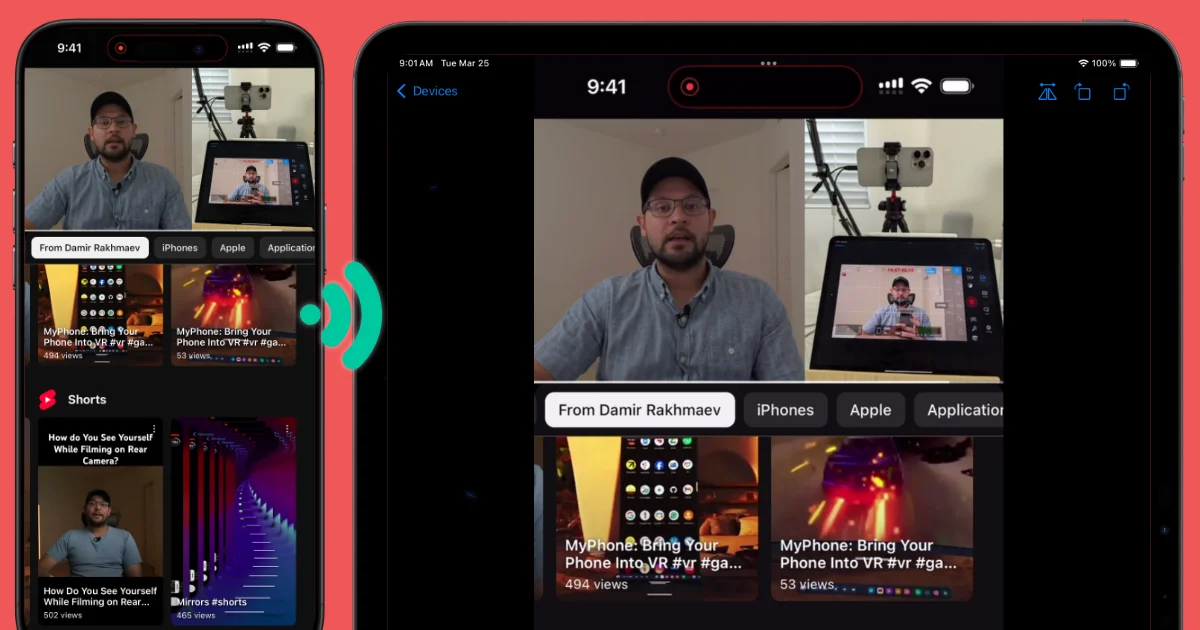
- Open the app on both and start mirroring from the iPhone. The live screen appears on your Mac — while you keep using the iPhone in your hands. That’s the point.
How the options compare
| VlogMonitor | Apple iPhone Mirroring | AirPlay to Mac | |
|---|---|---|---|
| Price | $14.99 once | Free | Free |
| Use iPhone while mirroring | ✅ that’s the point | ❌ pauses when unlocked | ✅ |
| Camera monitor while filming | ✅ | ❌ | Not designed for it, same-network only |
| Different Apple IDs | ✅ | ❌ | ✅ |
| Older iPhones / Macs | ✅ | ❌ needs iOS 18 + Sequoia | Depends on model |
| Without Wi-Fi (hotspot / USB) | ✅ | ❌ needs Wi-Fi + Bluetooth | ❌ |
| Android sender | ✅ | ❌ | ❌ |
Hi, I’m Damir (YouTube, IG, TikTok) — I make VlogMonitor. Fair warning: on this page I’ll talk you out of buying it if Apple’s built-in way already covers you.
I built VlogMonitor for one job Apple’s tools don’t do: keep a live, low-latency view of one device on another while you use both. Most of my users are creators who film with the iPhone and watch the framing on a bigger screen. I worked really hard to squeeze out the best possible quality with minimal latency (which, of course, can’t be zero) — I won’t quote you a fake milliseconds number, but the reviews below tell you creators frame shots with it in real time.
All the reviews below are genuine, and you can find them on the App Store page for the country mentioned.
Want to chat with me about the app? Join the Discord
Why to choose VlogMonitor
High image quality, works over iPhone’s Hotspot, and wired connections
Wow! Buy now!
I was almost about to pay for that overpriced and greedy app called ApowerMirror (which also works great) but thankfully a Reddit search brought me to this. One time purchase price? SOLD. I was able to mirror my camera app from my iPhone 17 Pro to my iPad Mini from across my entire house with very low latency. Incredible!
BobYourUncle—United States, 10/09/2025
Users say VlogMonitor is incredibly easy to use
Very nice app
Works as intended, developer is very nice and competent person. 10/10
Tomethyy—Germany, 02/20/2025
Great app
Useful app for video recording! Made the process less stressful and more controllable
vchrkv—Kazakhstan, 11/04/2024
No subscriptions. Period.
Works perfect
Saw this app named on Reddit, super fair price, works just as advertised, thanks so much!!
stupidfishycrap—Germany, 04/30/2025
Frequently Asked Questions
With what devices can I screen mirror using VlogMonitor? (tap to expand)
Can I use it outdoors or without Wi‑Fi?
Do the devices need to share the same Apple ID?
How much does it cost?
Need help or want a new feature?
4.8 Excellent | 90+ Reviews (US only)