4.8 Excellent | 90+ Reviews (US only)
Your iPad is the camera monitor you already own
Film with the iPhone’s good back cameras — and watch yourself, live, on the iPad. VlogMonitor connects them in one tap.
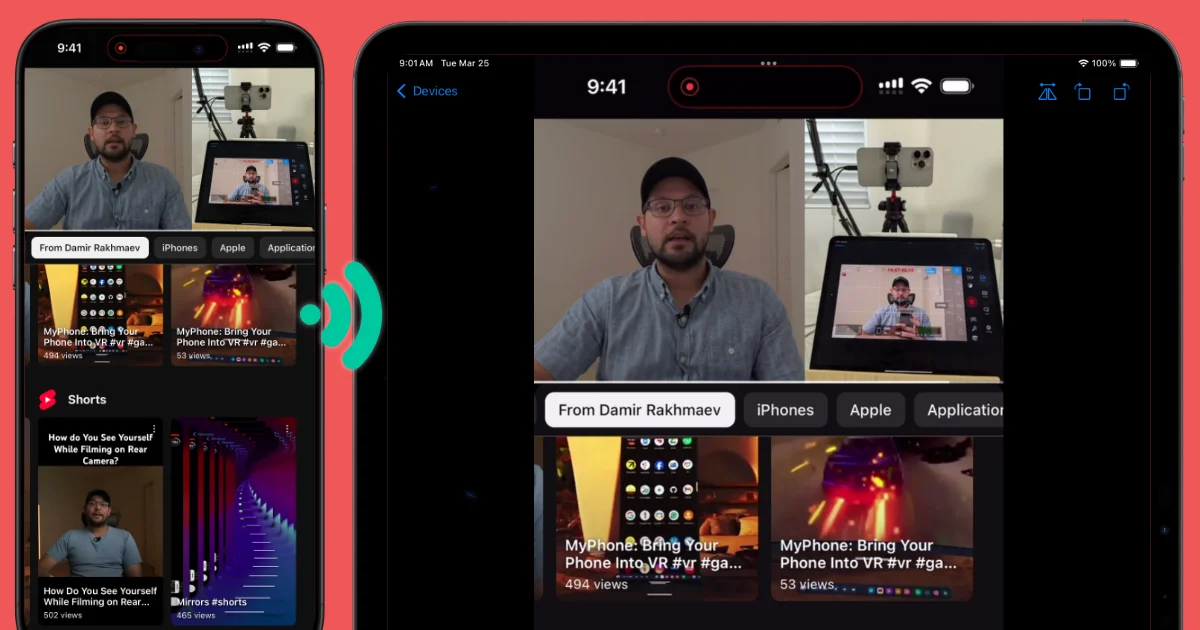
The short answer
You can use an iPad as a live camera monitor for an iPhone without extra hardware. Install VlogMonitor ($14.99 one-time) on both devices, start recording on the iPhone and watching on the iPad; the iPad shows the iPhone camera’s live view while you film with the back cameras. It works over Wi-Fi, a personal hotspot outdoors, or a USB cable. A dedicated field monitor does the same job but typically costs $60–300 and is another device to carry.
The problem every solo creator knows
The iPhone’s best lenses are on the back — pointed away from the screen. Film yourself with them and you’re framing blind: walk back to the phone, check, adjust, repeat. The usual fixes are all bad: flip to the weaker selfie camera, squint at a tiny screen from across the room, or buy a dedicated field monitor — a $60–300 gadget that’s one more thing to mount, charge, and carry. Meanwhile there’s a big, beautiful screen already in your bag.
How to use your iPad as an iPhone camera monitor
- Install VlogMonitor on both devices — iPhone and iPad. One-time $14.99 purchase, no subscription. One purchase covers all devices on the same Apple ID.
- Put them on the same network — same Wi-Fi at home or in the studio; outdoors, your iPhone’s Personal Hotspot works with no router at all, and so does a USB cable on supported models.
- Open the app on both, start from the iPhone, frame your shot on the iPad. Rotate or flip the view on the iPad if your rig mounts the phone sideways or upside down. Then hit record and stay in frame.
Why not a hardware monitor — or the selfie camera?
| iPad + VlogMonitor | Dedicated field monitor | Selfie camera | |
|---|---|---|---|
| Cost | $14.99 once | $60–300 | Free |
| Image you record | Back cameras — the good ones | Back cameras | The weaker front camera |
| Extra hardware to carry & charge | None you don’t already own | Yes | None |
| Screen size | Your iPad’s | Usually 5–7" | — |
| Works outdoors without Wi-Fi | ✅ hotspot or USB | ✅ | — |
One of my users put it better than I can: “It’s worth buying the app instead of buying another mirroring accessory.” Another was one click away from “a mirroring device from TikTok” for $60 before finding this. You’ll find both reviews below — they’re real.
Hi, I’m Damir (YouTube, IG, TikTok) — and yes, I’m selling offering you this app I crafted. I named it VlogMonitor, because this is exactly the job it was born for.
I worked really hard on VlogMonitor to squeeze out the best possible quality with minimal latency (which, of course, can’t be zero). I won’t quote you a fake milliseconds number — it depends on your network — but the reviews below tell you creators fine-tune lighting and framing with it in real time.
All the reviews below are genuine, and you can find them on the App Store page for the country mentioned.
Want to chat with me about the app? Join the Discord
What creators say
It replaces the gadget you were about to buy
content creators NEED this
i literally never leave a review for apps but THIS APP has saved my life if you film content on your back camera this app mirrors it onto another device so you can see exactly what you’re doing - so worth the money
emilycammxxx—United Kingdom, 03/20/2025
No lag while filming
If you want to film something without having to look at your phone screen this is the best app for it. I just mirror on my iPad so I can ensure my footage looks great without looking at my phone which is too far away for me to see. The lag is very very minuscule so I am so thankful I found this before I dumped 60$ on a mirroring device from TikTok! Thank you!
Mainachan—United States, 03/28/2025
Good enough to light a scene by
Outstanding app, great functionality, very responsive support.
This app does exactly what it says on the tin, it lets you use your iPad as an external monitor for your iPhone, so you can actually take advantage of those fancy big lenses and see what you are recording. There is almost no latency, and the image is very high quality, to the degree that I can fine tune lighting in a shot based on how it looks in the iPad monitor. It can work over Wi-Fi, Wi-Fi hotspots, and a wired connection which is ideal for me, as i do both studio filming and out-and-about vlogging. I had some questions about the functionality of the app and the developer responded right away and was extremely helpful. This app is a bargain if your workflow needs the functionality it offers. Recommend it very highly!
Soph19615—United States, 03/26/2025
Works like a charm
Had to put together a oblast minute Photo Booth for a work event but was dreading the idea of hanging to bring my iPad AND Sony camera AND tripods AND a light ring. This app affords the best of both worlds: retained the camera quality of iPhones front facing camera while maximizing the display onto the iPad
Christopher Chuateco—United States, 04/21/2025
Bigger film shoots too — directors and clients watching live
Simple & Efficient
Using it on a larger film shoot for monitoring purposes for shots done through iPhone. Needed to stream to director and clients. This app is perfect!
R.J. Ong—United Kingdom, 08/13/2025
Frequently Asked Questions
Does it work outdoors, away from Wi‑Fi?
Can I record while monitoring?
With what devices can I use VlogMonitor?
Do the devices need to share the same Apple ID?
How much does it cost?
Need help or want a new feature?
4.8 Excellent | 90+ Reviews (US only)